
From email to draft
Corporate filings prepared, without switching software
A corporate filings firm was entering the same information into three applications. Its practice management software has no API (connection interface). We built an agent that works behind the scenes: it reads the email and the documents, looks things up in the software the way a user would, and prepares the reply. The paralegal reviews it and sends it. Next step: a pilot on one paralegal's inbox.
3 software tools for the same information
- Before
- Every file keyed in three times, in three different applications.
- After
- An agent reads the email and the documents, looks things up in the firm's practice management software, which has no API (connection interface), and prepares the reply. The paralegal reviews and sends it.
By the numbers
- 3 applications where the same information was entered
- 12 manual steps for a typical filing
- 5 filing types covered, from email to draft
- 19 emails processed in a trial on fictitious files (October 21, 2026)
- 0 emails sent by the agent during these tests
- 0 duplicate files during these tests
Before: twelve steps, three rounds of data entry
- A typical filing, such as moving the registered office, took twelve manual steps.
- The same information (company, directors, share capital, addresses) was entered at least three times: in the practice management software, on the legal notices platform and on the INPI's one-stop shop for corporate filings.
- The list of documents was copied from one email to the next, and then someone had to follow up with the client, document by document.
- The firm didn't want a new tool or a form: its client relationships run on email.
Practice management software with no API
- The vendor confirmed it: no API is open to its customers.
- So the agent goes through Playwright (a browser automation tool). It opens the screens and reads the lists and records, as a user would.
- We mapped the screens on test records before connecting anything.
- In acceptance testing, on test files, the agent also created clients and files without duplicates, and resumed an interrupted creation without starting it over.
- The agent enters nothing itself: in its note it suggests a pre-filled link, and the paralegal checks and saves.
From email to draft
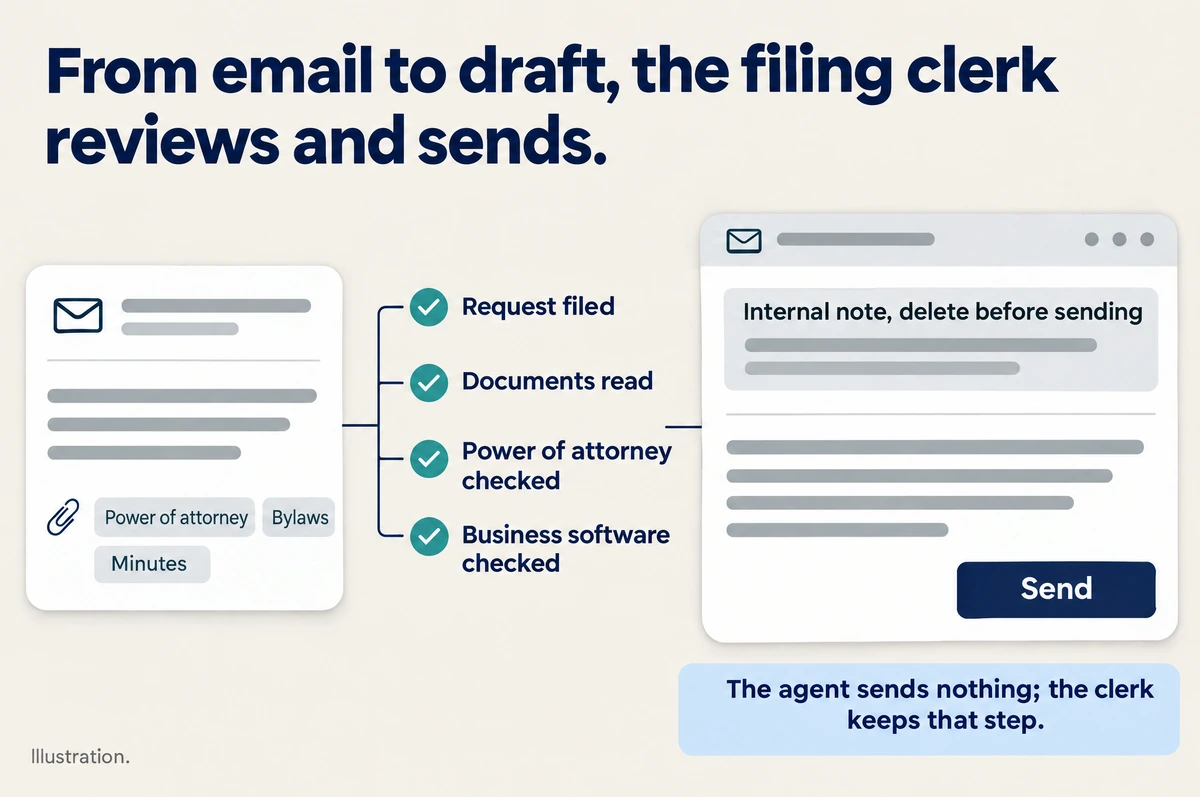
- The agent classifies the request, opens a document-collection file or adds to an existing one, and ignores irrelevant emails.
- It reads the attachments, scanned PDFs included: document type, signature, right company.
- It compares them with the documents required for that filing, according to the checklists of the greffe (court registry) and the firm.
- It checks the power of attorney. Without a valid one, no file is opened, and the draft says a power of attorney needs to be signed.
- It leaves a draft reply in the thread, with a note for the paralegal to delete before sending.
The cases covered
- Five filings: change of director, transfer of registered office, registration of a new company, cash capital increase, in-kind contribution.
- A follow-up in another thread joins the existing file.
- Two filings in the same email get one reply and two files.
- A simple question or a vague request opens no file. A simple thank-you produces no draft.
Guardrails
- The agent never sends email: that step stays with the paralegal.
- Every external access is closed by default and opened explicitly.
- Any doubt about the mandate or the signatory's authority goes to human review.
- The servers are with Scaleway (a French hosting provider), in Paris. The AI engine is Mistral, a French company.
- All tests were run on fictitious, clearly labeled files.
What's left to do
- The legal notice and the one-stop-shop filing plug in on the same principle.
- The pilot comes before any extension to other mailboxes.
- The goal: a single round of data entry per file.
Technologies
- Python
- FastAPI
- PostgreSQL
- Playwright
- Microsoft Graph
- Mistral
- Scaleway