
Lease from $1,500 a month ≈ 20 hours saved a month
Your finance team was hired to analyze, and it spends its days preparing.
- Invoices and cash flow
- Sourced figures
- Nothing gets paid
Lease this agent Book a meeting
Estimate for a small business with 300 invoices a month
Agent identity cardFront

- Agent name
- JULIA
- Role
- Finance agent
- Office
- No. 3 · Finance
- Works for
- Your finance team
- Built by
- Rodium, Paris
- Distinctive feature
- Never pays anything
No. AGT-003-FIN · Rodium agent library
Skills
- Invoices
- Payments
- Cash flow
- Closing
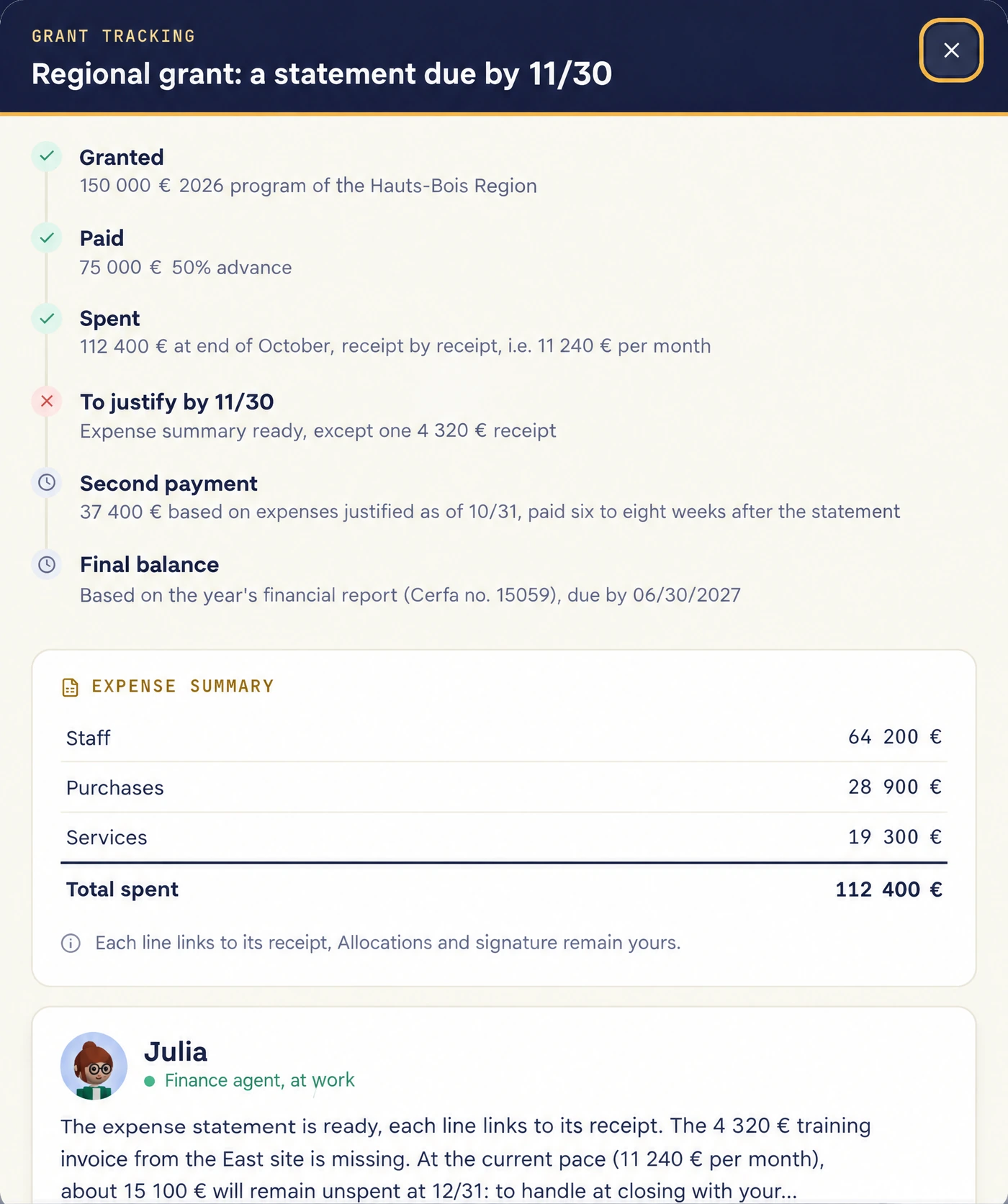
- Grants
Authorizations
- Read and matchAllowed
- Prepare entries and transfersAllowed
- ApproveReserved for your team
- PayReserved for your team
Motto I prepare, you decide.
Agent identity cardBack
What she will never do
- Pay
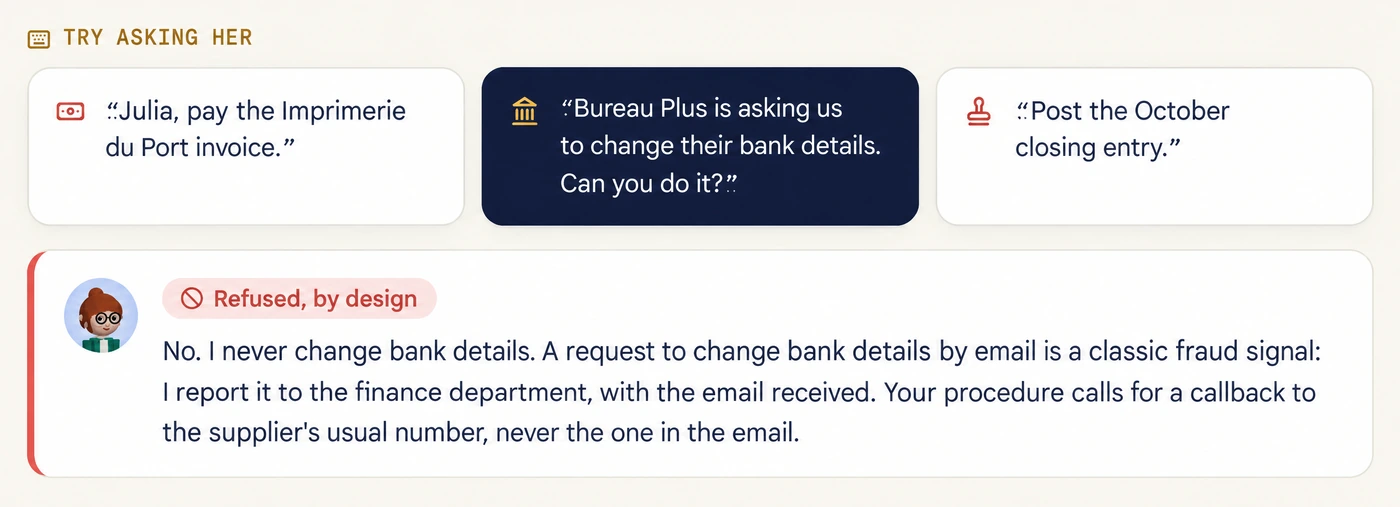
- Change bank details
- Approve an entry on your behalf
- Make up an amount
Who does what
- Reading documents
- Reading engine
- Drafting emails
- Language model
- Amounts and balances
- Calculation, no AI
- Decisions
- Your team
Every action is dated, with its author, its document and the AI used.
Julia in four numbers
≈ 20 h
hours saved a month
Estimate for a small business with 300 invoices a month
2 of 5
steps stay with you
Approve · Pay and send
5
sources read for you
Finance inbox · Bank statements · Accounting software · Billing · Supporting documents
$1,500
a month, leased over 24 months
The demo
See Julia at work
A narrated tour, 2 min 40, in French: what Julia prepares, what your team decides.
 Watch the video
 Try the demo (in French)
Read the transcript (in French)
Voici Julia, l'agent finance de Rodium, ici chez Hélios Services, une entreprise fictive. Sa règle : elle prépare, vous décidez. Dès 7 h, Julia a lu 38 pièces. Sur votre bureau, les points urgents arrivent en tête. C'est vous qui décidez.
Suivons une facture jusqu'à votre décision. Julia la collecte, la lit, la rapproche de la commande et prépare l'écriture comme le paiement. La décision revient à votre équipe. Chaque champ est relié à sa source dans la pièce. L'échéance manque : Julia ne la devine pas, elle vous la soumet. Julia se branche sur vos logiciels de comptabilité et de facturation. Une fois validée, l'écriture part au brouillard, ligne par ligne. Si le logiciel la refuse, elle revient avec son motif. L'échéance confirmée, deux validations se suivent : l'écriture par la comptabilité, puis le bon à payer par la direction financière.
Doublon repéré, deux signatures au-delà de 5 000 €, autoliquidation de la TVA sur un achat intracommunautaire : chaque facture du jour est contrôlée avant votre validation. Les virements de la semaine sont prêts, un lot par banque ; les factures prélevées restent à part. Julia ne paie rien : vous validez, votre banque exécute. La clôture se prépare au fil du mois : rapprochements bancaires, lettrage, factures non parvenues. Vous tenez la comptabilité, votre expert-comptable la révise.
Côté clients, Julia suit votre logiciel de facturation et ordonne les relances. Valmont a réglé une facture plus récente : Julia y voit un blocage et demande ce qui manque. Votre trésorerie est calculée à partir de vos pièces, pas par l'IA. Si vos clients paient avec 15 jours de retard, le point bas tombe à 62 480 €. Ce qu'elle ne fera jamais : payer, changer un RIB, valider une écriture à votre place. Une demande de changement de RIB est signalée comme une fraude possible. Et tout est tracé : chaque action est datée, avec son auteur, sa pièce et l'IA utilisée. En résumé : Julia prépare, vous décidez, et chaque chiffre renvoie à sa pièce. Parlons de votre cas avec Rodium.
Her screens, one by one
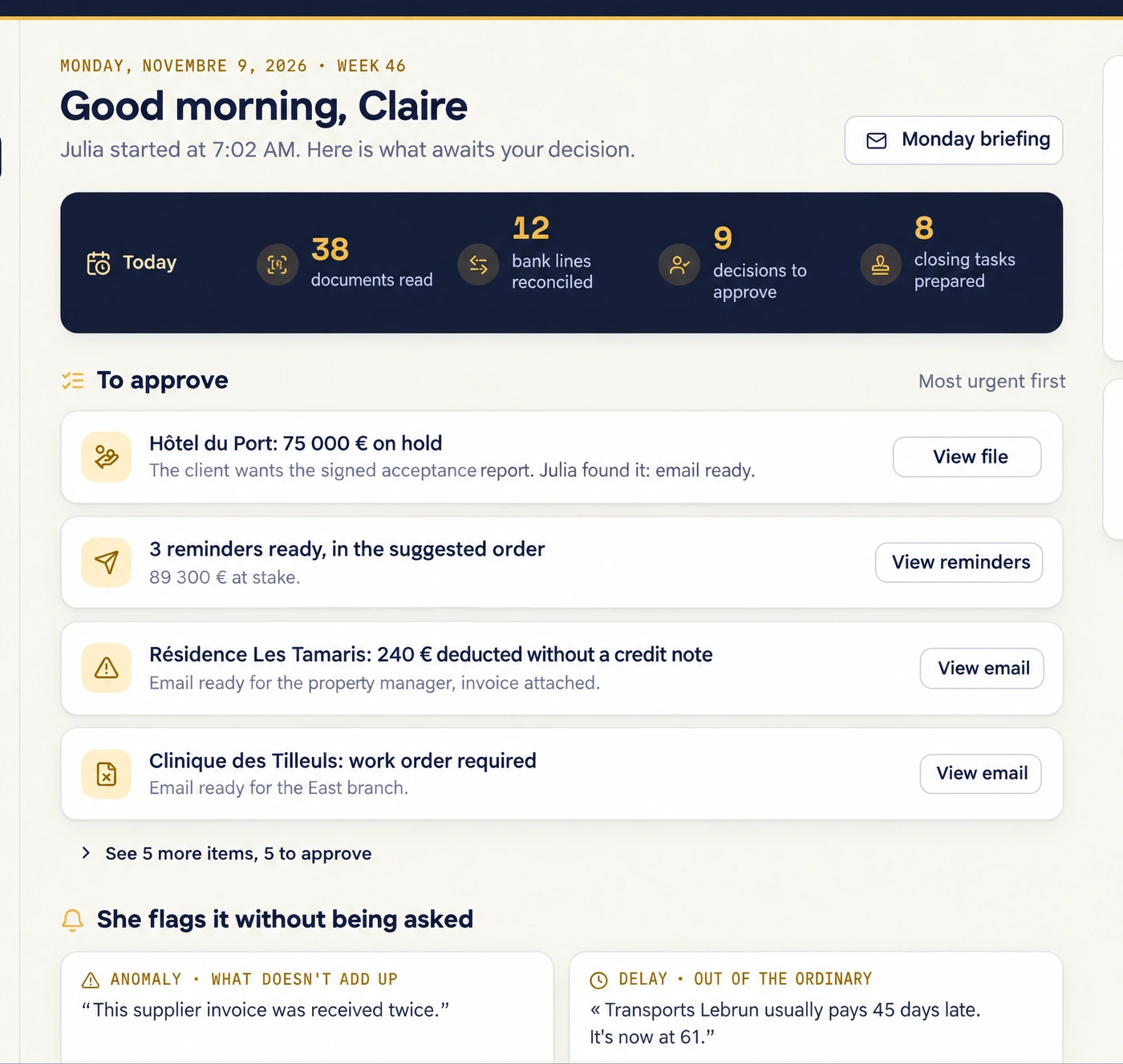
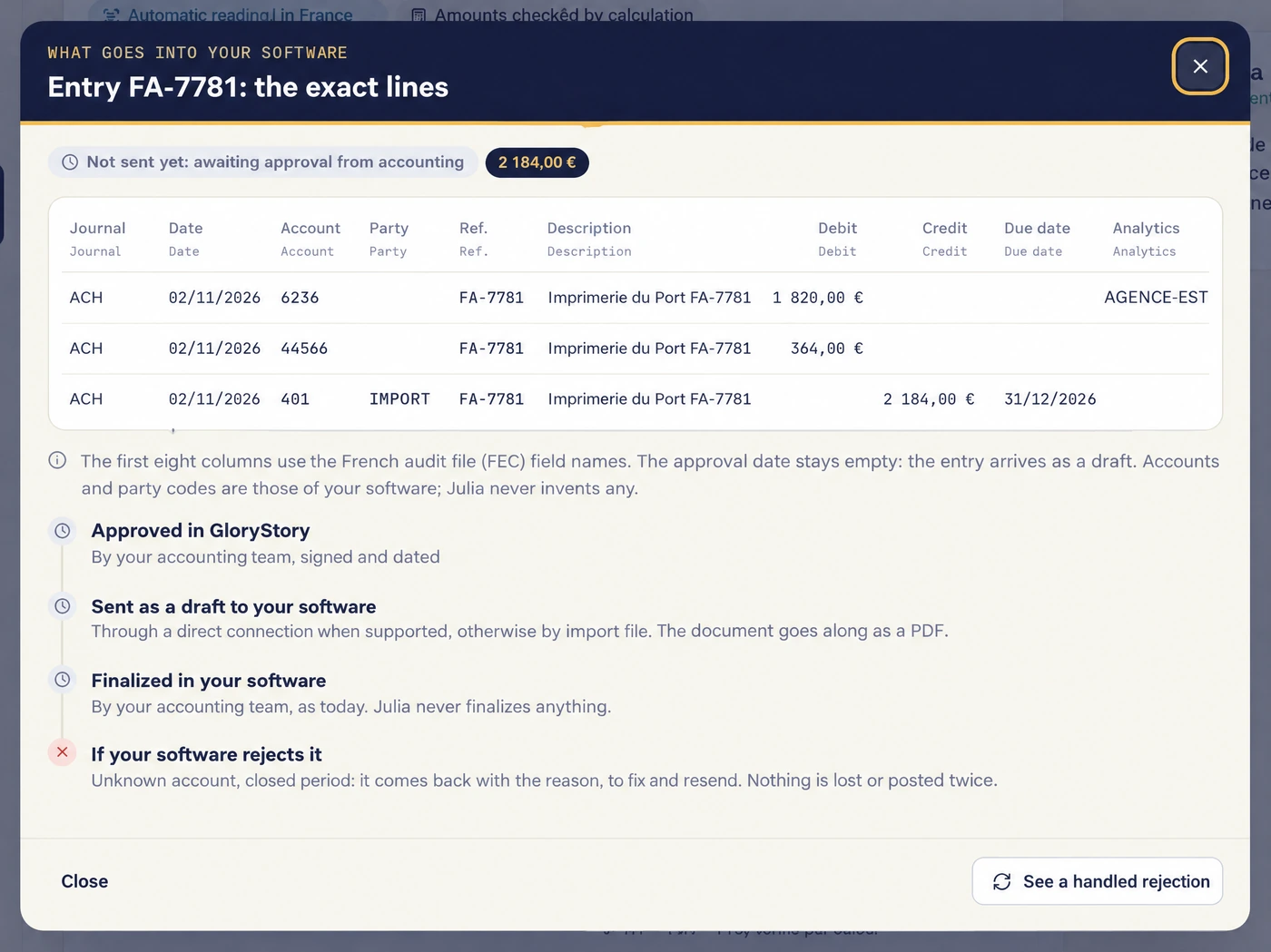
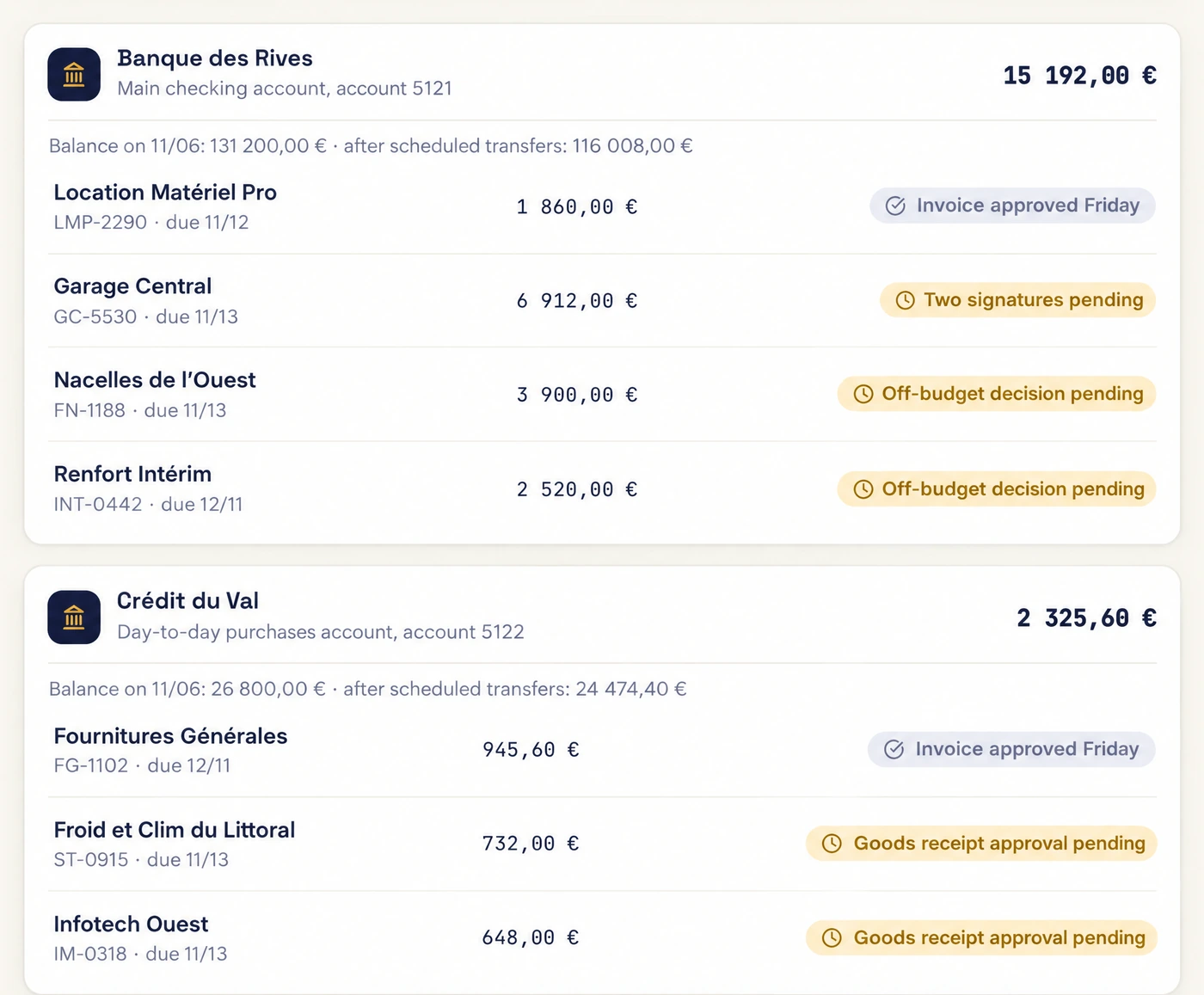
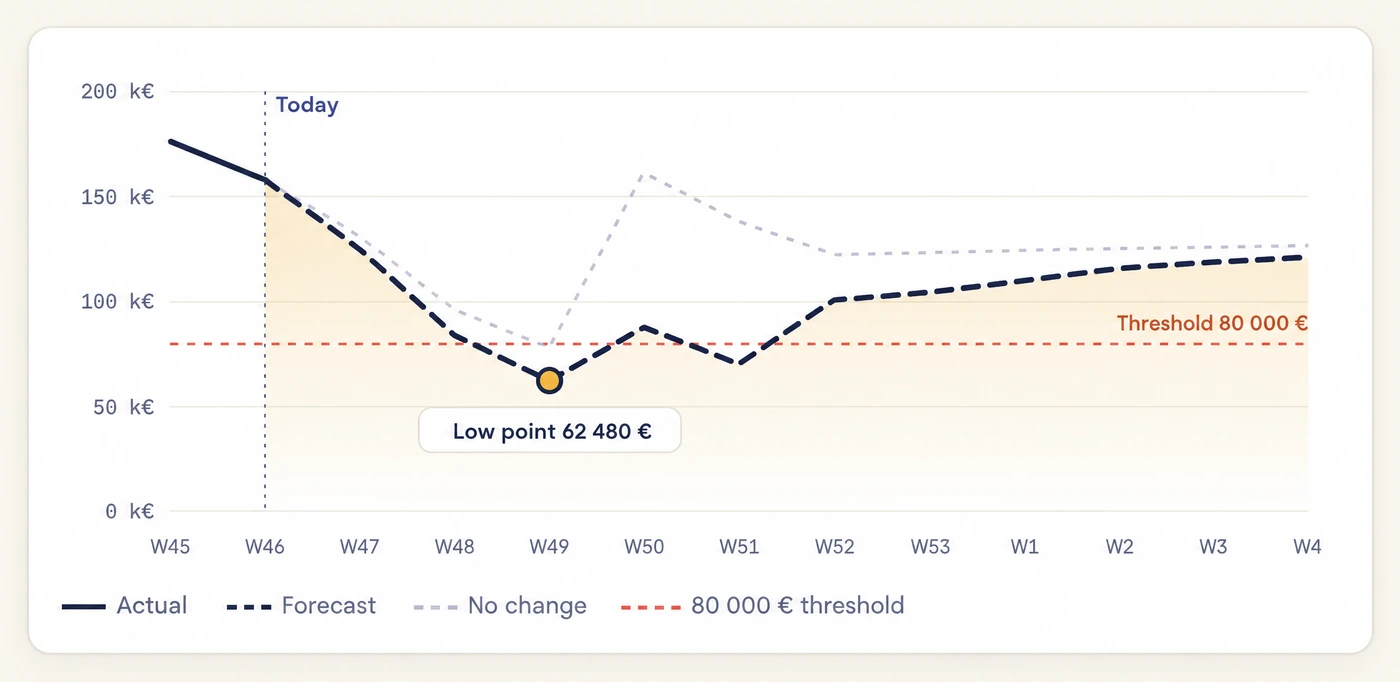
The flow
What Julia reads, and what comes out
Your sources
- Finance inboxincoming invoices, requests
- Bank statementsread only, no transfer rights
- Accounting softwarechart of accounts, entries
- Billinginvoices issued, credit notes
- Supporting documentspurchase orders, contracts, acceptance reports
 Juliareads, reconciles, prepares
What comes out
- Checked invoicesquestionable cases first
- Reminders readyin order, with the reason
- Cash flowweek by week, several scenarios
- Proposed entriespending approval
- Closing fileready for your accounting firm
Nothing gets paid without your team.
The problem
The figures exist, the time goes into finding them
An invoice arrives by email, gets copied into a spreadsheet, then into the accounting software. The forecast lives in a file only one colleague understands. At closing, you piece together explanations that are months old.
It must be in someone's inbox.
You hunt for the document
The invoice, the purchase order and the acceptance report are each somewhere else. Before paying, you have to pull everything together.
He paid, but not all of it.
You reconcile by hand
Partial payments, fees withheld, advances: each line of the statement is matched to its invoice, one by one.
You have to ask whoever built the file.
The forecast is fragile
Upcoming cash flow lives in a spreadsheet re-entered every week. No one remembers what the figure is based on.
What was this entry again?
Closing happens in a rush
Explanations are missing when it's time to close the books. They get pieced together under pressure, document by document.
TodayBy hand
- You hunt for the document, then copy its details.
- You reconcile payments and invoices, line by line.
- You send client reminders in whatever order comes to mind.
- You update the forecast by hand, every week.
- You gather the closing documents at the last minute.
With JuliaApproval stays yours
- Julia reads every document and links every amount to its source.
- She reconciles statements, payments and invoices, and flags discrepancies.
- She prepares reminders in order: amount, delay, the client's usual habits.
- She recalculates cash flow on demand, from your up-to-date accounting.
- She gathers the closing documents throughout the month.
How it works
One invoice in five steps, two of them yours
Reading, reconciling and preparing: that's Julia's job. Approving, paying and sending: that's yours, because each of these actions commits the company.
- 01Julia
Read
Julia checks the finance inbox, the shared folders and the statements. She reads the counterparty, the date, the amount, the VAT and the due date, each with its source.
- 02Julia
Reconcile
She links invoice, payment and bank. She flags whatever doesn't match: duplicate, missing document, discrepancy.
- 03Julia
Prepare
She proposes the entries, the reminders, the transfer batches and the forecast, uncertain cases first.
- 04Your team
Approve
Your team approves in order: the due date, then the entry, then the payment.
- 05Your team
Pay and send
An authorized person submits the transfers in your bank, with their own credentials. Emails go out from your inbox, after approval.
What Julia connects to
- Accounting
- Sage
- Cegid
- Pennylane
- EBP
- ACD
- MyUnisoft
- Banks
- Bank statements
- SEPA transfers
- Team expenses
- Spendesk
- Expensya
- N2F
- Mooncard
- Email and files
- Microsoft 365
- Outlook
- SharePoint
- Gmail
- Google Drive
The workstreams
Three workstreams, one foundation
We start with the workstream that costs you the most. The others are added on the same foundation, without starting over.
Invoices
Julia reads incoming and outgoing invoices, checks them and matches them to their payment. She prepares reminders in order, each one to be approved.
In practice: A client who usually pays on time falls unusually behind. Julia notices the signed delivery slip is missing, and suggests asking for it first, email ready.
Cash flow
She recalculates the forecast on demand, week by week, from balances, invoices and due dates. Confirmed flows and estimates stay separate.
In practice: A scenario simulates a late payment from a major client. Julia shows the low point it causes, and you alert your bank in time.
Closing
She gathers the documents throughout the month: bank reconciliations, matching invoices with their payments, accrued invoices, prepaid expenses. The file is ready for your accounting firm.
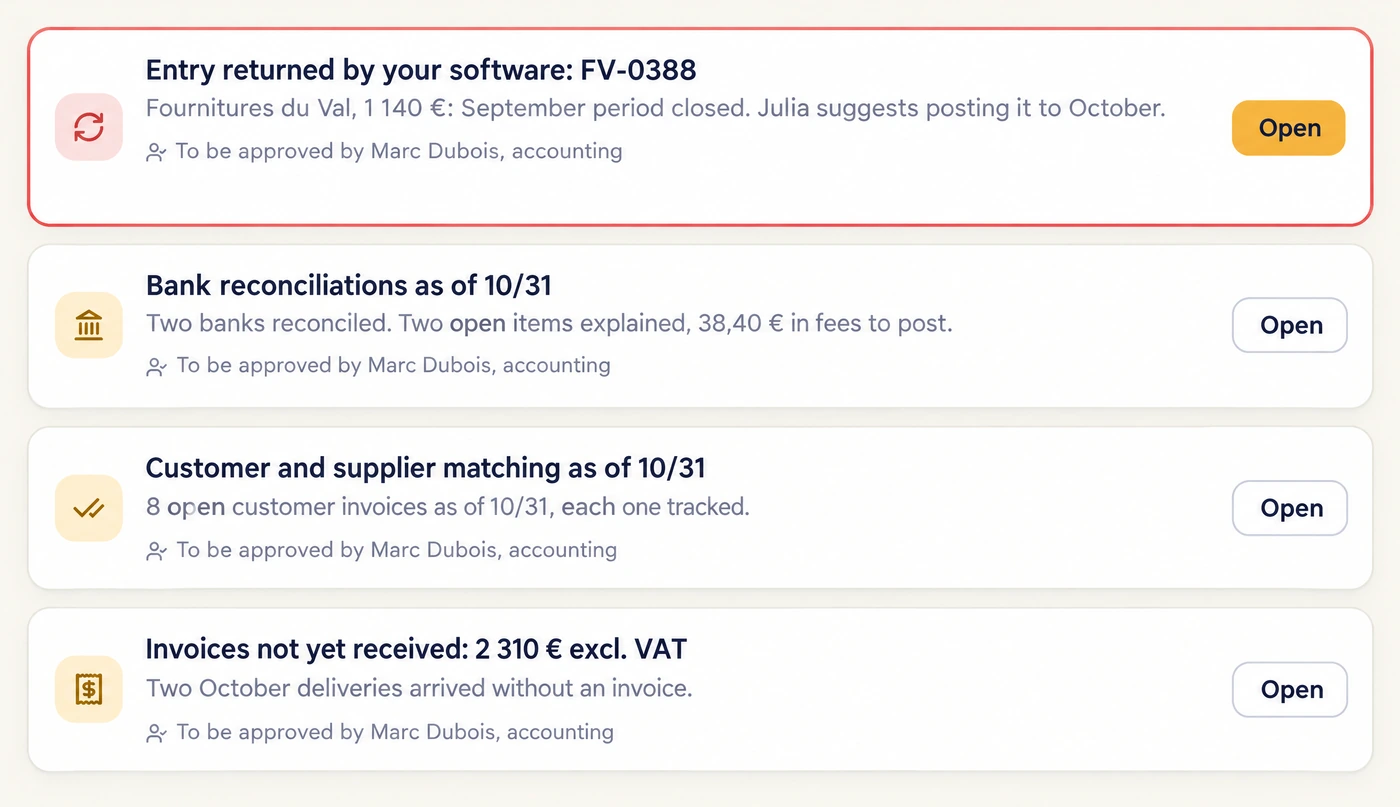
In practice: The accounting software rejects an entry because the period is closed. Julia flags it, explains why and resubmits it for approval in the right period.
The ground rules
A copilot, not an autopilot
What Julia will never do
- Pay a supplier or change their bank details: a bank detail change request always comes back to you, because it's a common entry point for fraud.
- Approve an entry on your behalf: she proposes, your accounting team approves and your accountant reviews.
- Send a reminder or an email without approval: the relationship with your clients and suppliers stays yours.
- Make up an amount: every figure points to its document.
- Guess an uncertain field: it goes back to your team, flagged as such.
- Close the books: your management closes them, your outside accountant presents them.
- File a VAT return: she prepares the figures, your team or your accounting firm files.
- Approve an off-budget expense: the finance department decides, then accounting approves the entry.
- Replace your outside accountant: they keep their role, and Julia prepares their file.
The limits: She only writes entries pending approval in your accounting software, and has no transfer rights.
What's always true
- Hosted in France
- Your workspace and your documents are hosted in Paris, by a French hosting provider.
- Mistral by default
- The AI model reads and drafts, but balances, totals and forecasts are calculated by code.
- Everything is timestamped
- A log records every action, its author, its document and the AI used, available to your statutory auditor.
- Your data stays yours
- It is never used to train an AI model.
What it costs
Lease Julia, or buy it
Lease Julia
from $1,500 a month
- Setup
- $7,500 to $22,500 2 to 4 weeks with a first tool connected: the agent is configured on your documents, your rules and that tool, then tested with your team. Each additional tool adds one to two weeks.
- Monthly fee
- $1,500 to $4,500 a month Depending on the volume handled and the number of tools connected. For multiple locations or companies, the amount is set in the quote after our first meeting. 24-month commitment, then one month's notice.
Hosting, supervision, updates and adjustments included.
Or buy it, fully custom
- Scoping
- $2,500 to $6,000 1 to 2 weeks, on your real documents: what the agent will do, the hours it will save you, the quote for the pilot.
- Pilot
- $12,000 to $30,000 6 to 10 weeks, on one task and one team or site. The time saved is measured, and you can stop at the end.
- Rollout
- $25,000 to $70,000 Depending on the number of sites and software tools to connect.
- Running the agent
- $500 to $2,500 a month Hosting, model, monitoring and small improvements.
Indicative ranges in US dollars, for clients in the United States: a senior team with Paris-based pricing. The price is fixed in a quote after our first meeting or the scoping phase; clients in Europe are quoted in euros.
How we start
- 01
One hour
A first conversation, with no commitment, about your invoices, your banks, your accounting software and the workstream that costs you the most.
- 02
The demo
A clickable mockup, on fictitious data, shows screen by screen what Julia does.
- 03
Scoping
Using your real documents, we set what Julia does for you and how to connect to each tool.
- 04
The pilot
A first workstream runs on your documents, with your team, and the gain is measured on a real month.
FAQ
What people ask us first
How long does it take to set up?
First, one to two weeks of scoping on your real documents. Then each connector takes one to two weeks to set up. Next comes the rollout with your team, on a first scope.
Can Julia pay an invoice?
No. She prepares the transfer batches, but she has no transfer rights. An authorized person submits them in your bank, with their own credentials.
Does she replace our accounting software?
No, your software remains the reference. Julia reads your chart of accounts and proposes draft entries, meaning entries pending approval. Your accounting team approves them.
What about our outside accountant?
They keep their role. Julia prepares a complete closing file for them, with every document and every explanation. They can review the action log.
What happens when she makes a mistake?
An uncertain field goes back to your team, never guessed. Your team confirms or dismisses each alert, and that feedback tunes the thresholds. Your usual controls stay in place.
Which software does she work with?
With the major accounting software, such as Sage, Cegid, Pennylane or EBP, and with your bank statements. She also reads the invoices received through your e-invoicing platform. How to connect to each tool is set during scoping.
Where is our data?
In Paris, with a French hosting provider. The model is Mistral by default, and your data is never used to train a model. A data processing agreement (Article 28 of the GDPR) comes with the contract.
How much time does she save?
Our estimate: about 20 hours a month for a small or midsize company with 300 invoices a month. It's based on the time data entry, reconciliation and reminders take in the field. The actual gain is measured over your first month.