
In service Lease from $1,500 a month ≈ 35 hours saved a month In production since July 2026
Payroll starts in the inbox, and nothing connects it to the payroll software.
- Payroll and contracts
- Keep your tools
- You decide
Lease this agent Book a meeting See the case study
Estimate for 150 employees across 6 sites
Agent identity cardFront

- Agent name
- CAMÉLIA
- Role
- HR agent
- Office
- No. 1 · Human resources
- Works for
- Your HR team
- Built by
- Rodium, Paris
- Distinctive feature
- Never runs payroll
No. AGT-001-RH · Rodium agent library
Skills
- Payroll preparation
- Contracts
- Exceptions memory
Authorizations
- Read emails, spreadsheets and formsAllowed
- Prepare payroll and contractsAllowed
- Write to your HR systemReserved for your team
- Run payrollReserved for your team
Motto I prepare, you decide.
Agent identity cardBack
What she will never do
- Run payroll
- Issue payslips
- Write to your HR system without recorded consent
- Message an employee without review
Who does what
- Hosting
- France, dedicated server
- Reading scans
- Engine hosted in the EU
- Contracts
- Your templates
- Decisions
- Your HR team
Login, approval, setting aside, generation: every action is recorded.
Camélia in four numbers
≈ 35 h
hours saved a month
Estimate for 150 employees across 6 sites
2 of 5
steps stay with you
Review · Enter
5
sources read for you
HR inbox · SharePoint · Forms · Payroll software · Assignment tracking
$1,500
a month, leased over 24 months
The demo
See Camélia at work
The guided tour in 2 min 25, in French: what Camélia prepares for payroll, and what your team decides.
 Watch the video
 Try the demo (in French)
Read the transcript (in French)
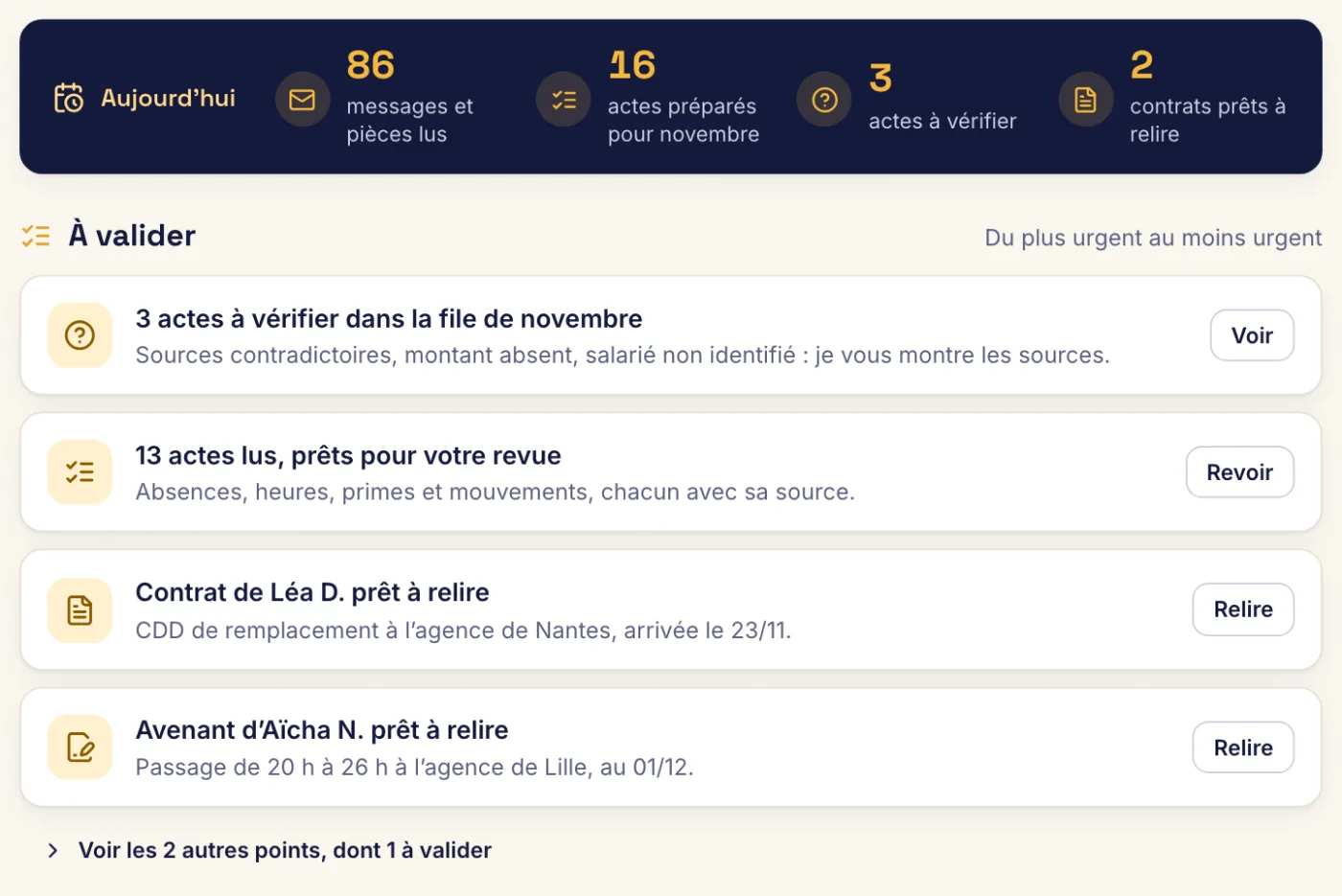
Voici Camélia, l'agent RH de Rodium, ici chez Opaline Services, une entreprise fictive. Sa règle : elle prépare, vous décidez. À 6 h 45, Camélia a déjà lu la boîte RH, les formulaires et les plannings. La file de novembre est prête : seize actes, dont trois à vérifier.
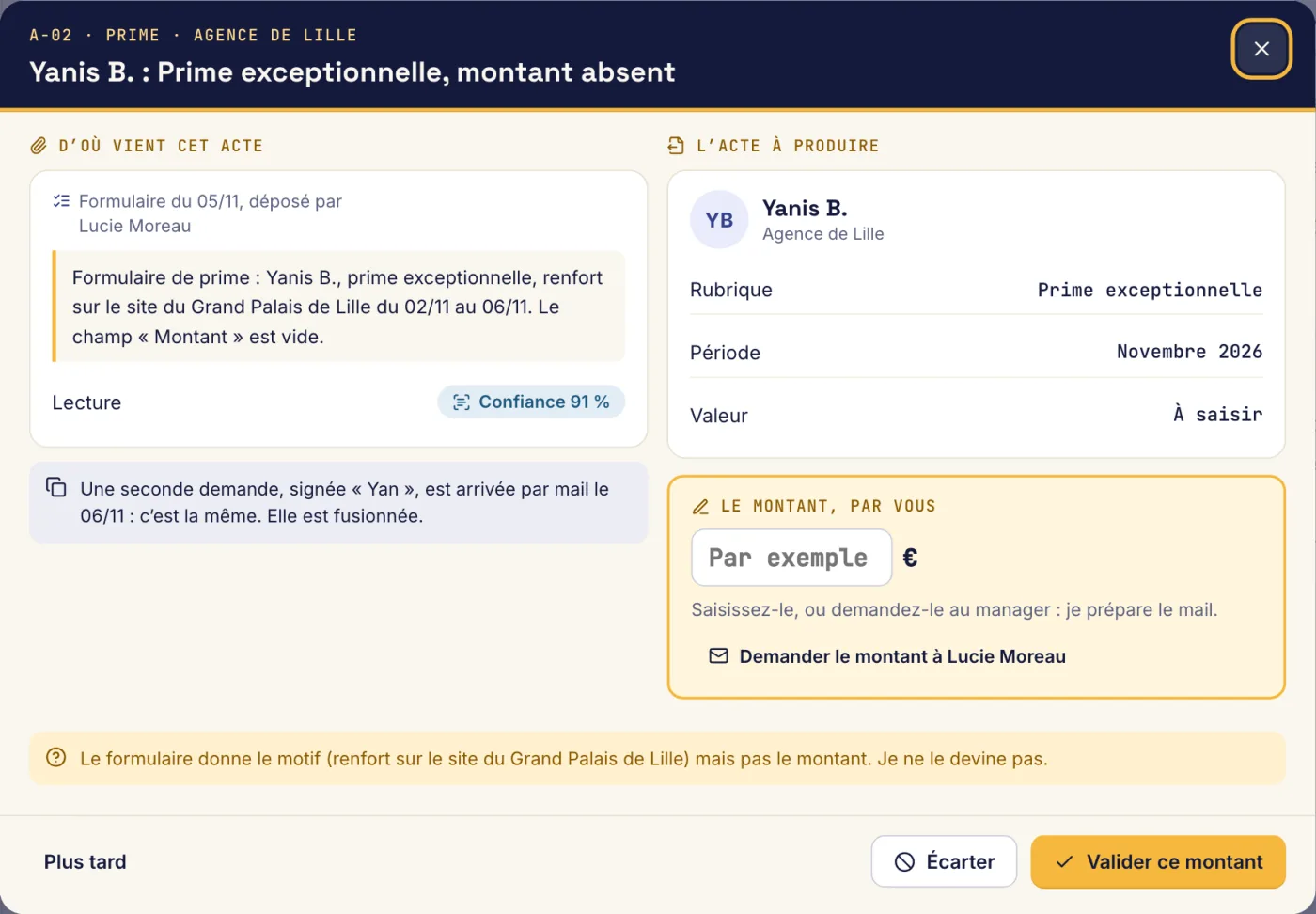
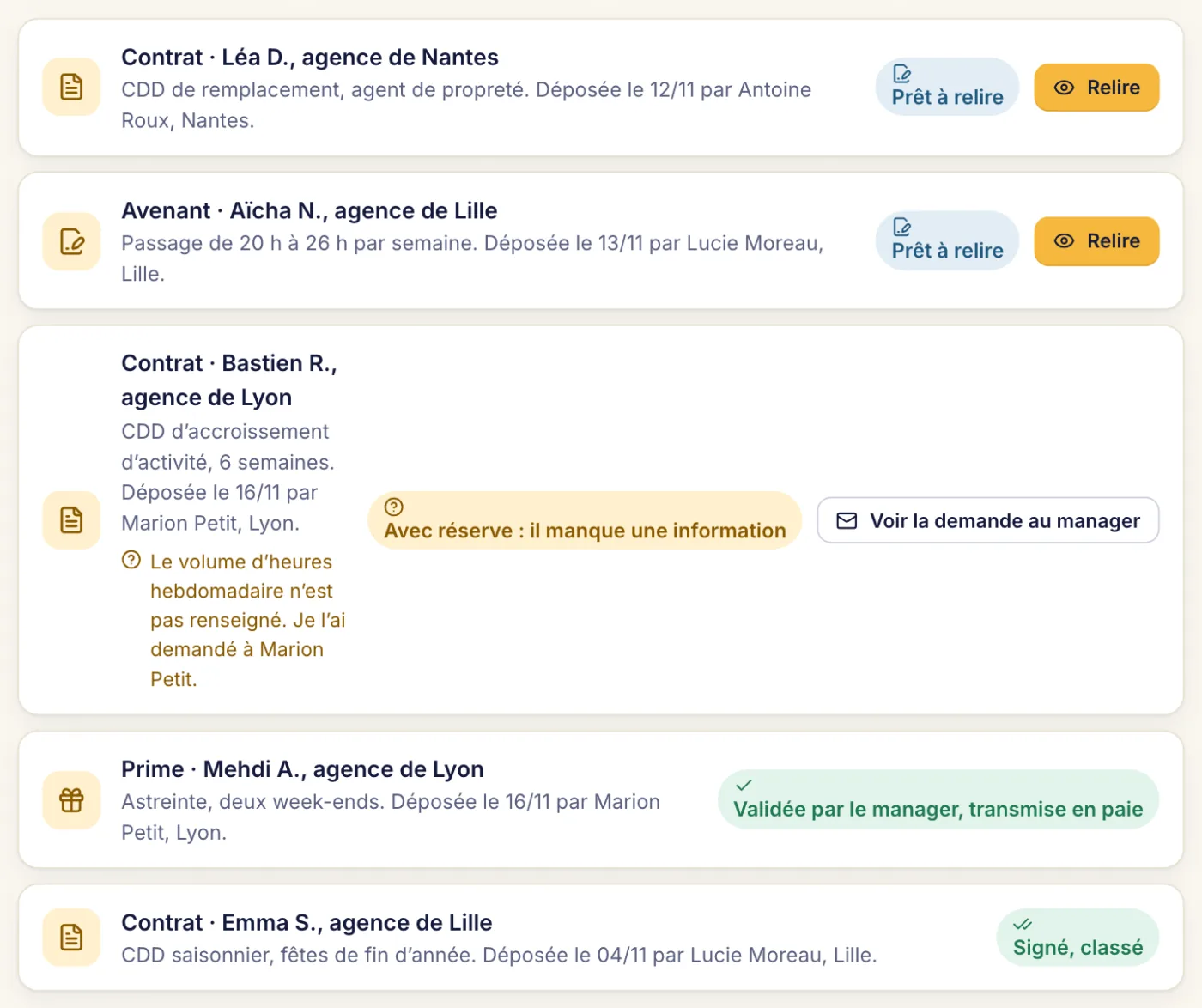
Suivons une prime exceptionnelle, du formulaire à la paie. Camélia la collecte, puis la lit, retrouve le bon salarié et vous la soumet. Revoir et saisir restent à votre équipe. Qui, quoi, quand, combien : chaque champ est lu avec sa source et un indice de confiance. Le montant manque : Camélia ne le devine pas. « Yan », c'est Yanis B. : sa seconde demande est un doublon, fusionné. Deux sources qui divergent vous sont soumises. Dans la file, chaque acte nomme sa source. Les cas signalés sont mis en évidence ; les actes lus se relisent, puis se valident. Le planning dit 3 heures, le chef d'équipe 5 : Camélia vous montre les deux sources. Vous choisissez : c'est daté et signé.
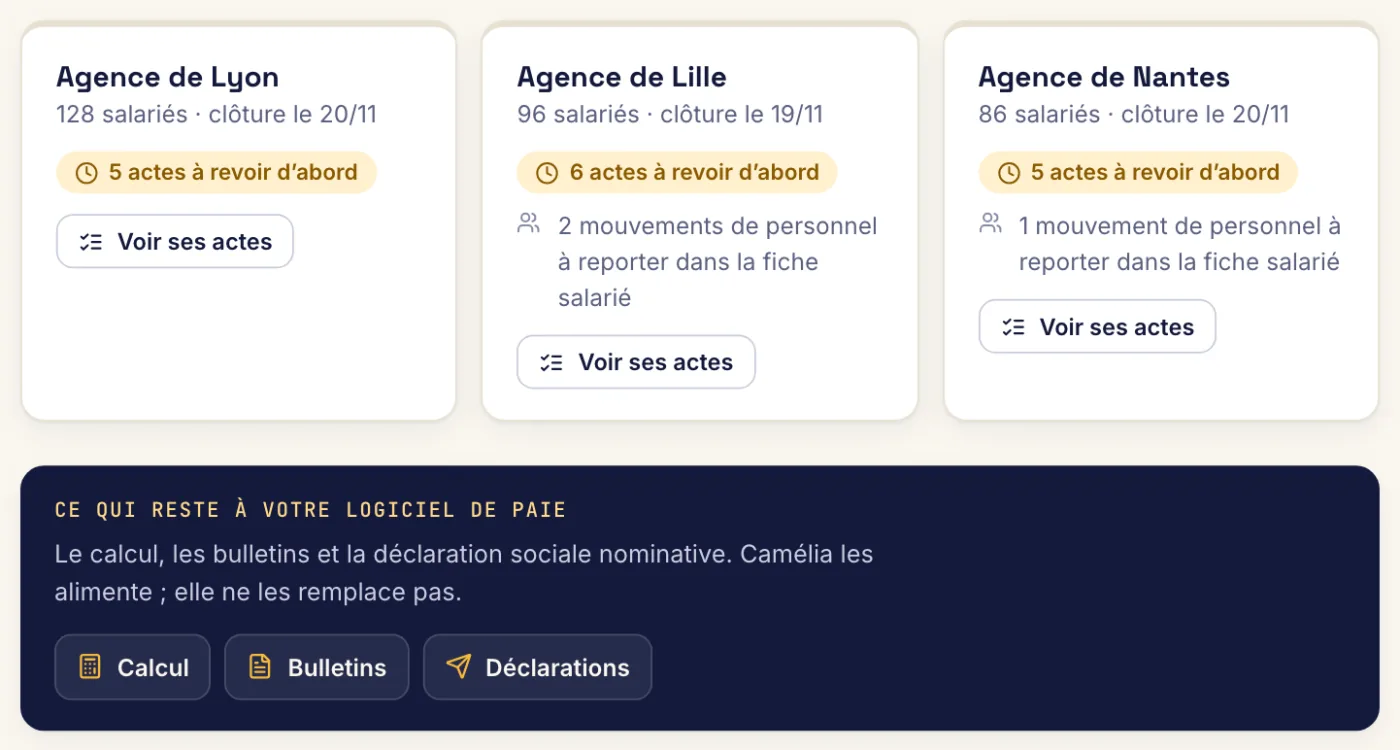
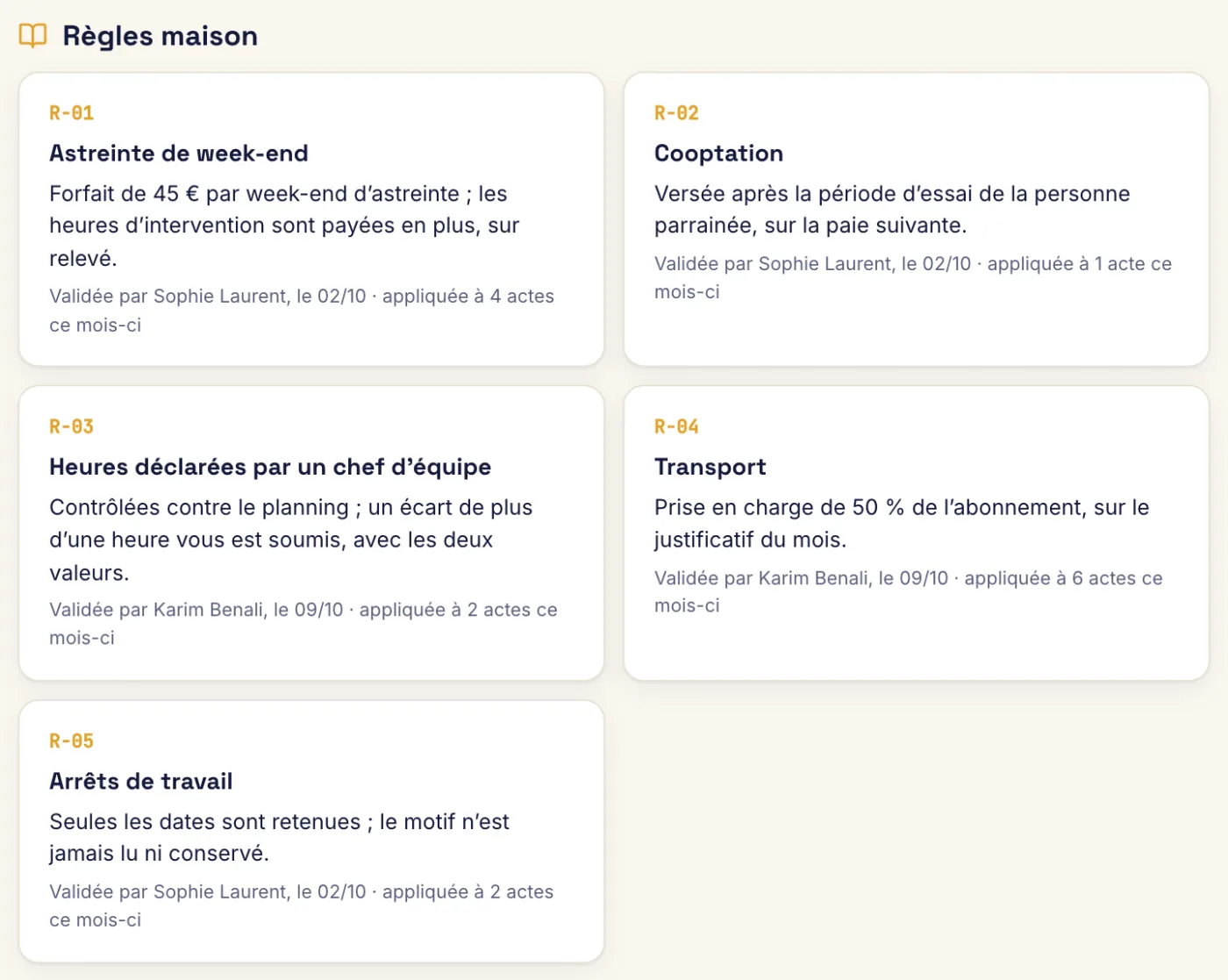
Un fichier d'import par agence, ou une saisie guidée. Une fois l'import fait, Camélia relit votre logiciel pour contrôler chaque variable. Le calcul et les bulletins restent les vôtres. Les contrats partent de vos modèles maison. S'il manque un motif, une date ou l'état civil, rien ne sort : Camélia dit pourquoi. Le CDD de Léa D. : les champs viennent de la demande du manager, les contrôles sont faits. La déclaration d'embauche reste à votre équipe. Chaque arbitrage devient une règle écrite, datée et signée. Camélia ne l'applique qu'une fois validée par vous.
Ce qu'elle ne fera jamais : lancer la paie, écrire à un salarié sans relecture, noter ou classer quelqu'un. C'est voulu. Tout est tracé : chaque geste est daté, avec son auteur, sa source et l'IA utilisée. En résumé : Camélia prépare, vous décidez, et chaque acte renvoie à sa source. Parlons de votre cas avec Rodium.
Her screens, one by one
The flow
What Camélia reads, and what comes out
Your sources
- HR inboxsick notes, supporting documents, bonuses
- SharePointHR tracking spreadsheets
- Formsrequests from managers
- Payroll softwareemployee records, hours, absences
- Assignment trackinghours worked in the field
 Caméliacollects, cross-checks, verifies
What comes out
- Action item queueto approve, line by line
- Payroll importvariable pay items, ready
- Contractsyour templates, filled in
- Memoryrules and exceptions
- Discrepanciesmissing document, contradiction
Nothing goes into payroll without review.
The problem
The work nobody should have to do
The same information is re-entered four times, with only one chance to get it right. It's not a skills problem. It's a plumbing problem: nothing connects incoming information to the payroll software.
Email, spreadsheet, form.
Information arrives in a jumble
Each channel has its own format. Nothing connects them until someone re-enters the data.
Then into a tracking sheet, then into the HRIS.
It gets re-entered
The HRIS (human resources information system) receives data already entered somewhere else. The same line exists in several copies.
Copied from the last one.
The contract is drafted by hand
You start from the last document and change the fields. A wrong date or an extra clause slips through with the rest.
So, too late.
The error shows up on the pay stub
The check comes after the calculation. Fixing it then costs more than stopping the line on the way in.
TodayBy hand
- You hunt for the attachment in an email thread.
- You re-enter the same figure several times.
- You draft the contract from the previous one.
- You find the error on the pay stub.
- The know-how lives in one person's head, at the mercy of vacations and sick days.
With CaméliaThe review stays yours
- Everything lands in one place, matched to the right employee.
- Data is read once, then reused wherever it's needed.
- The contract comes out filled in, ready for you to review.
- Inconsistencies are flagged before data entry.
- The rules are written down, and a handover takes an hour.
How it works
The month in five steps, two of them yours
Collecting, reading and matching: that's Camélia's job. Reviewing and entering: that's yours, because the employer is accountable for payroll.
- 01Camélia
Collect
All your channels are checked continuously, without anyone having to lift a finger.
- 02Camélia
Read
Who, what, when, how much: the essentials are pulled from each document. Scans and photos are read too.
- 03Camélia
Reconcile
Each item is matched to the right employee. Duplicates and discrepancies between sources are flagged.
- 04Your team
Review
Your team makes the calls in an action item queue. Every decision is logged.
- 05Your team
Enter
Your team enters the data in the payroll software, guided item by item.
The tools Camélia can work with
- Payroll and HRIS
- PayFit
- Silae
- Sage
- Cegid
- ADP
- Lucca
- Nibelis
- Personio
- Email and files
- Microsoft 365
- Outlook
- SharePoint
- Teams
- Forms
- Excel
- Google Workspace
- Time and scheduling
- Kelio
- Bodet
- Horoquartz
- Skello
- Combo
- Around the contract
- Yousign
- DocuSign
- Universign
- Swile
- Edenred
In production today: PayFit, Microsoft 365 and Trofy. For the others, Camélia works through the vendor's API, an export or by reading the documents; the connection is scoped at the first meeting.
The workstreams
Three workstreams, one place
The same foundation serves all three: data is read only once, then reused everywhere. We start with the workstream that costs you the most.
Payroll
Absences, bonuses, commuting costs, extra or missing hours: each item becomes an action item to enter. Your team reviews the queue, then enters the data in its payroll software.
In practice: A manager sends a scanned sick leave note on Friday evening. On Monday morning, the action item is waiting in the queue, with the employee, the dates and the supporting document.
Contracts
Your templates for fixed-term, permanent and industry-specific short-term contracts (CDD, CDI and contrat d'usage) are filled in word for word. If the legal reason, the dates or the employee's personal details are missing, the document isn't generated, and the screen says why.
In practice: A fixed-term hire shows up in the spreadsheet with no legal reason for the fixed term. Camélia holds the contract and asks for the reason before generating it.
Memory
Every judgment call becomes a written rule, viewable on screen. Handovers no longer start from scratch.
In practice: One site pays a bonus based on a local custom. The rule is written once, then applied every month without anyone having to repeat it.
The ground rules
A copilot, not an autopilot
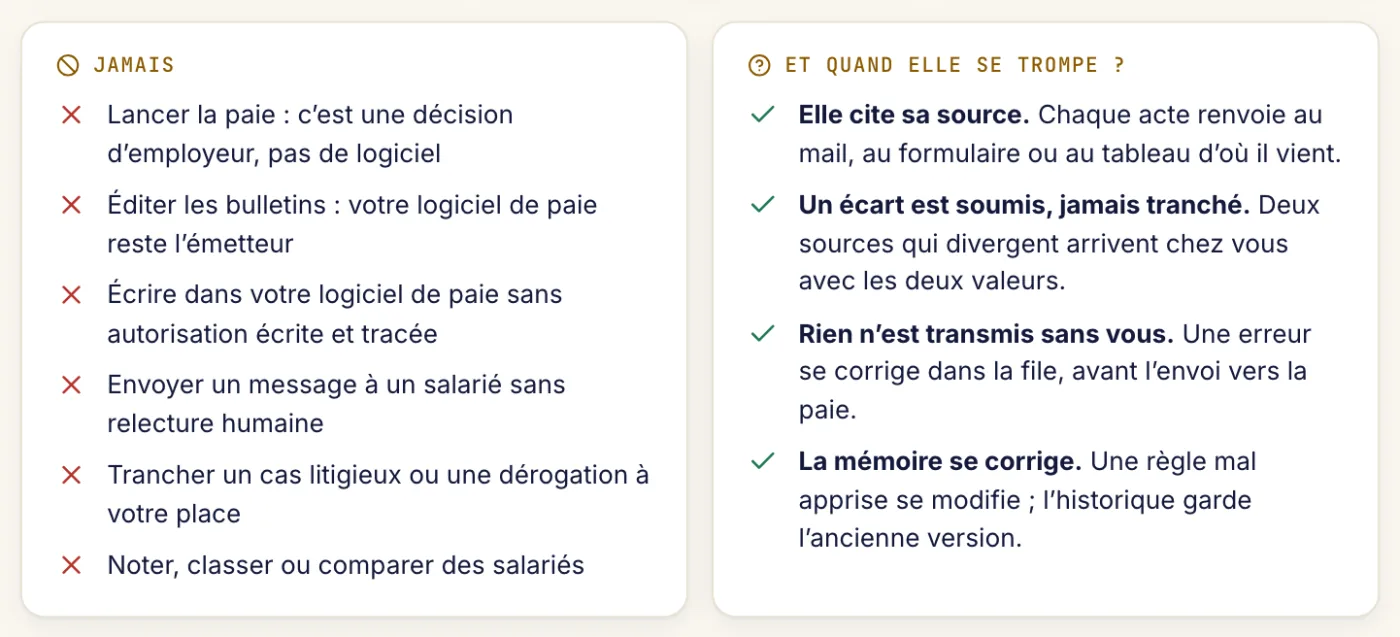
What Camélia will never do
- Send a message to an employee without review: the relationship stays the employer's.
- Rule on a disputed case or an exception: that's an employer's decision.
- Make up an amount: every figure comes from a document or a written rule.
- Send employee data outside the region you chose: by default, the reading happens in Europe.
- Store a medical diagnosis: from a sick leave note, she keeps only the person, the dates and the type of leave.
- Run payroll: that's an employer's decision, not a software decision.
- Issue pay stubs: your payroll software remains the issuer.
- Enter data for you: importing and data entry remain human tasks.
- Rate an employee: she produces no scores and no rankings.
The limits: She writes nothing into your payroll software or your HRIS without written, logged authorization.
What's always true
- Hosted in France
- A dedicated server with a French hosting provider, backed up every day with an integrity check.
- Mistral by default
- A European model, hosted in the European Union, reads your documents, and your data is never used to train a model.
- Traceability
- Sign-in, approval, dismissal, generation: every action is logged, with a named account for each person.
- The paperwork, included
- A data processing agreement (GDPR Article 28), a record of processing entry and a note for your CSE, the French works council, if you have one.
- No automated decisions
- Camélia prepares, your team decides. It is not used to recruit or to evaluate employees.
What it costs
Lease Camélia, or buy it
Lease Camélia
from $1,500 a month
- Setup
- $7,500 to $22,500 2 to 4 weeks with a first tool connected: the agent is configured on your documents, your rules and that tool, then tested with your team. Each additional tool adds one to two weeks.
- Monthly fee
- $1,500 to $4,500 a month Depending on the volume handled and the number of tools connected. For multiple locations or companies, the amount is set in the quote after our first meeting. 24-month commitment, then one month's notice.
Hosting, supervision, updates and adjustments included.
Or buy it, fully custom
- Scoping
- $2,500 to $6,000 1 to 2 weeks, on your real documents: what the agent will do, the hours it will save you, the quote for the pilot.
- Pilot
- $12,000 to $30,000 6 to 10 weeks, on one task and one team or site. The time saved is measured, and you can stop at the end.
- Rollout
- $25,000 to $70,000 Depending on the number of sites and software tools to connect.
- Running the agent
- $500 to $2,500 a month Hosting, model, monitoring and small improvements.
Indicative ranges in US dollars, for clients in the United States: a senior team with Paris-based pricing. The price is fixed in a quote after our first meeting or the scoping phase; clients in Europe are quoted in euros.
How we start
- 01
One hour
We look at your channels, your templates and your company rules, with no commitment.
- 02
One to two weeks
Read-only access, the first connectors and your templates transcribed: the tool runs on your data.
- 03
A month in parallel
Camélia and your team prepare the same payroll month, then you compare and decide.
- 04
Rollout
Camélia prepares every month, fixes and improvements included, and your data remains your property.
FAQ
What people ask us first
Does Camélia replace our payroll software?
No. She doesn't run payroll or issue any pay stubs: your software remains the issuer. Camélia prepares what goes in, then gives you an action item queue to review.
Do we need to change our HRIS?
No, you migrate nothing. Camélia reads your tool through its API (the vendor's official interface), through an exported file, or straight from the document: PDF, scan or photo.
Which software does she work with?
PayFit, Microsoft 365 and Trofy run in production. For the others (Silae, Sage, Cegid, Lucca, Google Workspace…), Camélia works through the vendor's API, an export or by reading the documents; the connection is scoped at the first meeting.
Where is our data hosted?
On a dedicated server with a French hosting provider, backed up every day. A sick leave note is health data: the diagnosis is removed before anything is saved, and the original document stays under restricted access. No employee data leaves Europe.
Is Camélia already running?
Yes. Camélia is in service at a client, where she prepares payroll and contracts. The client's HR team reviews, decides and enters the data.
Where do the figures she proposes come from?
From your documents and your written rules. When a document is unreadable or contradictory, she doesn't guess. The discrepancy is flagged for you, with the reason.
How much time does she save?
Our estimate: about 35 hours a month for 150 employees across 6 sites. It's based on the time these tasks take in the field. The actual time saved is measured during the month prepared in parallel.
What happens if we stop?
Your data remains your property. Camélia sat alongside your software: she leaves without you having to change anything.